VXDISKCONFIG – UnixArena’s Manual Page /usr/sbin/vxdiskconfig – configure disk devices and bring them under VxVM control (Scanning newly detected hardware & building device node directory) Example: Disk Currently in control by VXVM DEVICE TYPE DISK GROUP STATUS c1t0d0s2 auto:sliced rootdisk01 rootdg online invalid c2t0d0s2 auto:sliced rootdisk02 rootdg online invalid Disk’s newly attached to the system […]
VxVM – vxdisksetup Command syntax with Examples
VXDISKSETUP -UnixArena’s Manual Page /opt/VRTS/bin/vxdisksetup – Configure a disk for use with VERITAS Volume Manager The vxdisksetup command configures the disk for use by VERITAS Volume Manager (VxVM). ‘vxdisksetup’ is called by the vxdiskadd command as part of initial disk configuration. It is not typically necessary to call this command directly. [box type=”note” align=”alignleft” ]Note: In release […]
VxVM – vxdiskunsetup Command Syntax with Examples
vxdiskunsetup – UnixArena’s Manual Page /opt/VRTS/bin/vxdiskunsetup – Remove the VERITAS Volume Manager configuration This command removes the VERITAS Volume Manager configuration from one or more disks. This command reverses the configuration done by the vxdisksetup command. This operation makes the disks unusable by VxVM. This command can be applied only to VxVM-initialized disks that are not […]
VxVM – vxdisk Command Syntax with Examples
vxdisk – UnixArena’s Manual Page /usr/sbin/vxdisk – Define and manage VERITAS Volume Manager disks The vxdisk utility performs basic administrative operations on disks. Operations include initializing and replacing disks, as well as taking care of some book-keeping necessary for the disk model presented by VERITAS Volume Manager (VxVM). [box type=”note” align=”alignleft” ]Note: A disk does not have […]
VxVM – vxedit Command Syntax with Examples
/usr/sbin/vxedit– Unix Arena’s Manual page Product – Veritas Volume Manager-vxvm (Storage Foundation) /usr/sbin/vxedit – create, remove, and modify VERITAS Volume Manager Records The vxedit utility sets and changes attributes for VERITAS Volume Manager (VxVM) configuration records that do not depend upon volume usage types. Each invocation can be applied to only one disk group at a time. […]
VxVM – vxmend command syntax with examples
/usr/sbin/vxmend – UnixArena’s Manual page /usr/sbin/vxmend – mend simple problems in configuration records The vxmend utility performs various Veritas Volume Manager (VxVM) usage-type-specific operations on subdisk, plex, and volume records. Tasks Switches Put the named plexes or volumes into an offline state vxmend [-g diskgroup] [-o useopt] [-U usetype] off name… Take the named plexes or volumes […]
VxVM – vxinfo Command syntax with examples
/usr/sbin/vxinfo – UnixArena’s Manual page /usr/sbin/vxinfo – Print accessibility and usability of volumes The vxinfo utility reports a usage-type-dependent condition on one or more volumes in a disk group.A report for each volume specified by the volume operand is written to the standard output. Volume conditions: Volume Condition Description Startable A volume can be started […]
VxVM – vxlist – Command syntax with examples
/opt/VRTS/bin/vxlist – UnixArena’s Manual Page /opt/VRTS/bin/vxlist – displays records of the Storage Foundation configuration. Tasks Switches Setting up or initialize storage foundation records /opt/VRTSsfmh/adm/dclisetup.sh Display Consalidated storage foundation information vxlist [-g diskgroup] List the Veritas Volume Manager alerts vxlist [-g diskgroup] alert List the Volume Manager cache objects vxlist [-g diskgroup] cache List the disks […]
VXVM – vxtask command examples with syntax
/usr/sbin/vxtask – List and administer VERITAS Volume Manager Tasks The vxtask utility performs basic administrative operations on VERITAS Volume Manager (VxVM) tasks that are running on the system. Operations include listing tasks (subject to filtering), modifying the state of a task (aborting, pausing, resuming), and modifying the rate of progress of a task. VERITAS Volume Manager Tasks represent […]
AWS IAM – Users – Group – Policies- Management – Part 5
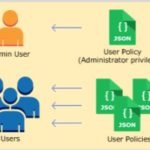
AWS IAM (Identity Access Management) allows you to create the new users , groups and delegates the roles to users and groups using policy documents. AWS policy documents are written in simple JSON (JavaScript Object Notation) language and it’s easy to understand. The policies are readily available and we are not expected to write JSON […]