Dive into the exciting world of AI agents and their communication infrastructure. By the end of this blog post series, you’ll be able to demystify AI agents, understand the roles of MCP servers and clients in LLM ecosystems, and learn how they enable seamless interaction between different AI components.
This blog post series covers the following topics.
1. Introduction to AI Agents. (Part 1 )
2. Large Language Models Overview (Part 1)
3. Model Context Protocol Fundamentals (Part 2)
4. MCP Servers and Clients (Part 2)
5. Integrating MCP with AI Agents ( Part 3 – You are here )
6. Advanced MCP Applications ( Part 3 – You are here )
5. Integrating MCP with AI Agents
5.1 Putting MCP to Work
So far, we’ve learned what AI agents are and how the Model Context Protocol (MCP) helps them connect with the outside world. We know that an agent acts as an MCP client to communicate with an MCP server, which exposes tools and data. Now, let’s get practical. How do we actually give an agent these abilities?
Integrating MCP isn’t about flipping a switch. It involves equipping your agent with the logic to discover, connect to, and communicate with MCP servers. This turns a standard AI agent into one that can dynamically access new capabilities without needing to be rewritten.
MCP provides a standardized way for AI agents to access tools, perform actions, and exchange data — allowing them to become context-driven and capable of acting intelligently.
Fastn UCL
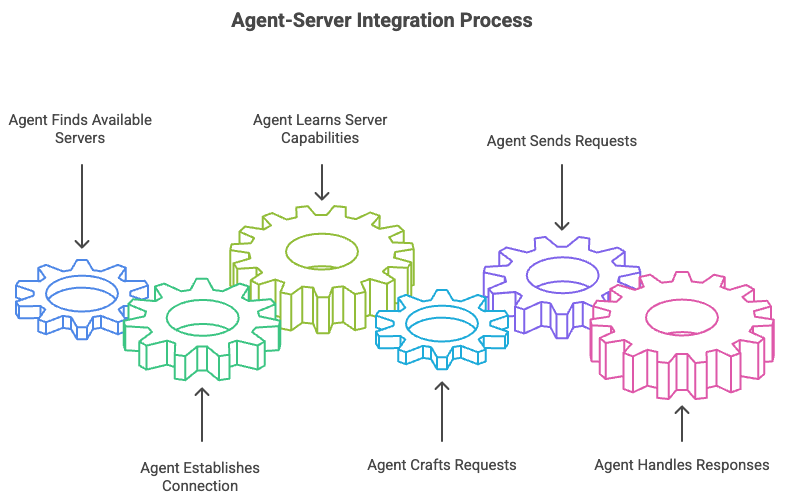
The integration process can be broken down into a few key steps. First, the agent needs to find available servers. Then, it establishes a connection and learns what the server can do. Finally, it crafts and sends requests to use those tools, handling the responses it gets back. Think of it like a person arriving in a new city. They first find a directory of local services (discovery), then call one up (connection), ask what they offer (introspection), and finally make a specific request (action).
5.2 Integrating with Frameworks
Building an MCP client from scratch is possible, but it’s often easier to use existing AI frameworks that are starting to support the protocol. These frameworks handle the low-level details of communication, letting you focus on the agent’s logic. Two popular examples are LangChain and LangGraph.
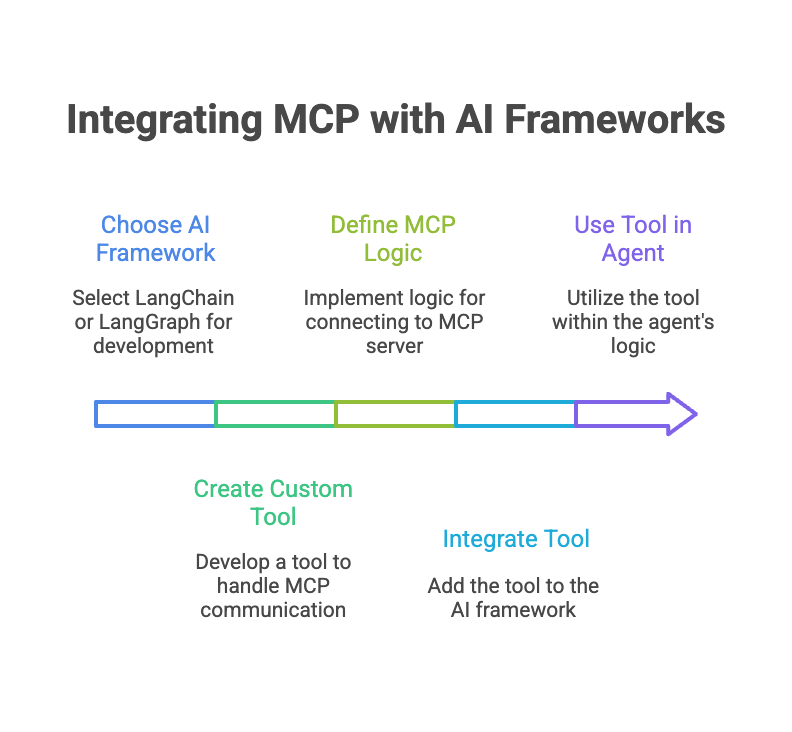
LangChain is a framework for developing applications powered by language models. It provides modular components for things like managing prompts, connecting to data, and chaining calls together. To integrate MCP, you would create a custom Tool in LangChain. This tool would contain the logic for connecting to an MCP server and calling its functions. Once defined, the agent can use this MCP tool just like any other LangChain tool.
import { ChatPromptTemplate } from "@langchain/core/prompts";
import { ChatOpenAI } from "@langchain/openai";
import { MCPTool } from "./mcp_tool.js"; // Custom tool for MCP

// 1. Initialize a tool that connects to an MCP server
const projectManagementTool = new MCPTool({
  name: "project_manager",
  description: "Manages project tasks, deadlines, and statuses.",
  serverUrl: "mcp://localhost:8080"
});

// 2. Create an agent with the MCP tool
const model = new ChatOpenAI({ model: "gpt-4o" });
const modelWithTools = model.bindTools([projectManagementTool]);

// 3. The agent can now use the tool
const result = await modelWithTools.invoke(
  "What are the open tasks for the Q3 launch project?"
);
LangGraph, which is built on LangChain, is used for creating more complex, stateful agents that can loop, reflect, and modify their own plans. It represents agents as graphs where nodes are functions and edges are the paths between them.
In LangGraph, you might dedicate a node in the graph to tool introspection and another to tool execution. When the agent decides it needs an external capability, it transitions to the ‘discover tools’ node, which queries an MCP server. Based on the results, it then moves to an ‘execute tool’ node, passing the necessary parameters. This graph-based approach is powerful for building sophisticated agents that can reason about which tools to use and in what order.
5.3 Best Practices and Challenges
When integrating MCP, a few best practices can save you headaches down the road. First, design your MCP servers to expose a clear and consistent set of tools. An agent can only be as good as the tools it’s given. Use clear names and descriptions so the agent’s LLM can easily understand what each tool does.
Second, implement robust error handling. MCP servers can become unavailable, and tool executions can fail. Your agent should be able to handle these failures gracefully, perhaps by retrying the request or trying a different tool.
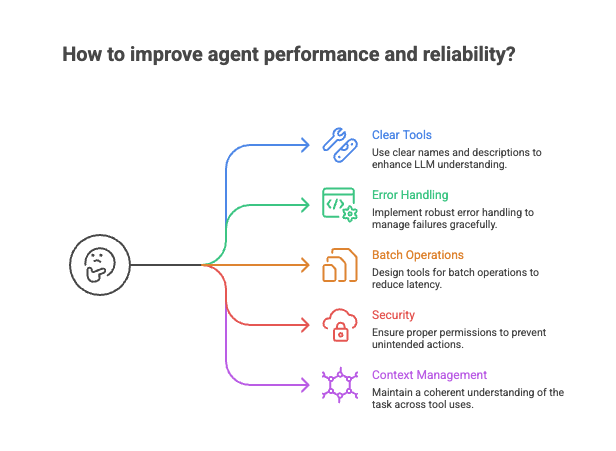
A common challenge is latency. Each call to an MCP server adds network delay. For complex tasks requiring multiple tool calls, this can add up. One solution is to design tools that can perform batch operations, allowing the agent to get more done with a single request.
Another challenge is security. Since agents are executing actions on external systems, it’s critical to ensure they have the proper permissions. Use the authentication mechanisms built into MCP to control access. An agent designed to read calendar events shouldn’t be able to delete files. By scoping permissions carefully, you can prevent unintended or malicious actions.
Finally, ensuring context is managed correctly is key. The agent needs to maintain a coherent understanding of the task across multiple tool uses. MCP helps by providing a standardized way to pass information, but the agent’s core logic must be smart enough to stitch the results together into a cohesive plan.
By maintaining context as AI systems move between different tools and datasets, MCP enables more sophisticated reasoning and more accurate responses.
Agency Blog
By following these guidelines, you can build powerful agents that leverage the full potential of the Model Context Protocol, turning them from simple chatbots into capable, autonomous systems that can interact with the digital world in meaningful ways.
6. Advanced MCP Applications
6.1 Beyond a Single Agent
So far, we’ve treated the Model Context Protocol (MCP) as a bridge connecting a single AI agent to a world of external tools. This is a powerful concept, but it’s just the beginning. The true potential of MCP unlocks when we move beyond one-to-one connections and start building systems where multiple AI agents collaborate to solve complex problems.
By treating other agents as specialized tools, MCP enables sophisticated communication, delegation, and workflow orchestration. It provides the standardized language for a team of AIs to work together, each contributing its unique expertise.
6.2 Agents Talking to Agents
The core idea is simple: an AI agent’s capabilities can be exposed through an MCP server. This means one agent (acting as the client) can make a request to another agent (acting as the server) just as it would with any other tool, like a database or an API.
The server agent doesn’t need to know it’s being called by another agent, and the client agent doesn’t need to know the ‘tool’ it’s using is actually another complex agent. MCP handles the communication, abstracting away the complexity.
This approach enables a modular, microservice-like architecture for AI. You can build a team of highly specialized agents:
- A researcher agent that scours the web and internal documents.
- A coding agent that writes, tests, and debugs code.
- A database agent that runs complex SQL queries.
- A customer communication agent that drafts emails and support tickets.
An orchestrator or “manager” agent can delegate tasks to these specialists, combining their outputs to achieve a goal far more complex than any single agent could handle alone.
MCP provides the “context glue” that allows Agentic AI systems to operate coherently
Mezimo.com
6.3 Orchestrating Complex Workflows
With agent-to-agent communication as a building block, we can design and automate entire workflows. An orchestrator agent can manage a sequence of operations, calling different tools and agents via MCP at each step, passing the output of one step as the input to the next.
Imagine a content creation workflow. A user provides a simple topic, like “Explain quantum computing.” The orchestrator agent then initiates a multi-step process, coordinating a team of specialist agents to produce a final article.
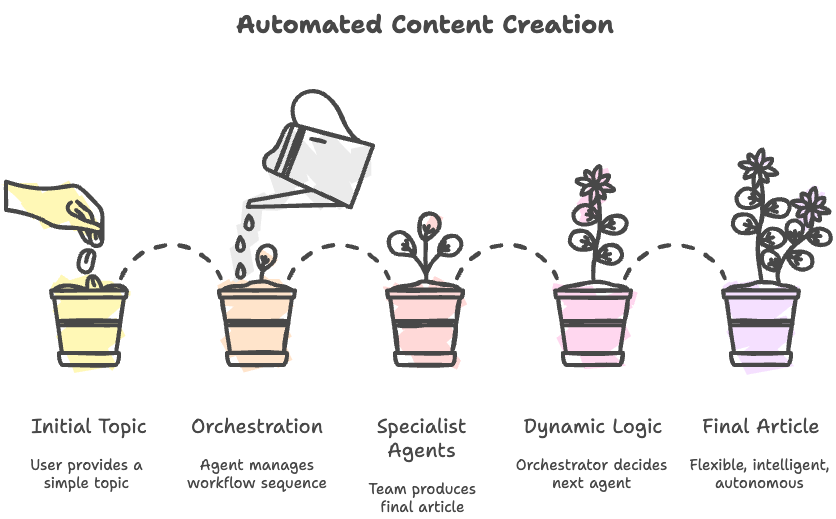
This orchestration is dynamic. The orchestrator agent can use logic to decide which agent to call next based on the results from the previous step. If the research brief is too technical, it might call an additional “simplification agent” before passing the text to the writer. This allows for flexible, intelligent, and autonomous execution of complex tasks.
6.4 MCP in the Real World
These concepts are not just theoretical. MCP’s ability to create interoperable AI systems is driving innovation across industries.
| Industry | Application | How MCP Helps |
|---|---|---|
| Software Dev | An AI agent that writes code, runs tests, reads error logs, and pushes fixes to a repository. | Connects a ‘coder’ agent to a ‘tester’ agent (via a testing framework) and a ‘version control’ agent (Git). |
| Healthcare | An AI assistant that analyzes a patient’s electronic health record, cross-references it with the latest medical research, and suggests potential diagnoses to a doctor. | An ‘EHR agent’ securely fetches data and passes it to a ‘research agent’ for analysis, ensuring modularity and data security. |
| Finance | An automated system that monitors market data, executes trades based on algorithmic rules, and generates performance reports. | A ‘market data’ agent feeds real-time info to a ‘trading’ agent, while a ‘reporting’ agent pulls results for analysis. |
| Logistics | An AI that optimizes shipping routes in real-time by analyzing weather data, traffic patterns, and vehicle availability. | A central ‘logistics’ agent queries a ‘weather’ agent, a ‘traffic’ agent, and a ‘fleet’ agent to make its routing decisions. |
In each case, MCP acts as the universal connector, allowing different specialized systems—whether they are AI agents, databases, or external APIs—to communicate effectively. This eliminates the need for custom, one-off integrations for every new tool or service.
By enabling agent-to-agent communication and complex workflow orchestration, MCP provides the foundation for building the next generation of intelligent, collaborative, and autonomous AI systems.
By building systems of collaborating agents, we move from simple tool-using AI to truly autonomous systems capable of tackling complex, multi-step problems across any domain.
Leave a Reply