Protecting customer data on their workstation and laptop is very essential. Most of the uncommitted valuable data reside in Laptops and Desktops. Most Organizations protect the endpoints using regular backups and recover the data in no time in case of hardware failures or accidental deletion. This article will walk you through how to install and […]
VMware
Virtual Machine on Apple Mac chip M1/M2 – Fusion/Vagrant
All new Macbooks are shipping with M1 / M2 chips which are based on ARM (Advanced RISC Machines). Apple is no longer releasing the x86-based MacBooks to eliminate the intel dependencies for any advancement. It also brings a lot of challenges for people who are very familiar with intel macbooks which support most of the […]
kubernetes cluster setup – k8s LAB using Kubespary – Part 1

How to set up a Kubernetes cluster in an automated fashion on our LAB environment? This article will walk you through kubernetes installation on Ubuntu on my windows 10 workstation. Getting hands-on on kubernetes is not a big task nowadays. There are hundreds of kubernetes variants available in the market including managed kubernetes environments like […]
BDRSuite v5.2 – Recover ONPREM VM on Azure Quickly

BDRSuite v5.2 is generally available now. BRDSuite v5.2 includes multiple features including restoring the VMware VMs, Hyper-V VMs, Windows Servers & Windows Workstations backups to Microsoft Azure. It also brings On-demand backup scheduling for Microsoft 365 backups, User-level backup report for Microsoft-365, and On-demand backup scheduling for Google Workspace backups. This article will walk you […]
Protect VMware estate using Dell EMC Networker – vProxy appliance

Dell EMC NetWorker provides the ability to perform virtual machine backup and recovery by using the NetWorker VMware Protection solution with the vProxy appliance. It does support vSAN datastore for its virtual appliance known as vProxy, it supports running image backups and restores virtual machines running on vSAN datastores. NetWorker directly manages the vProxy appliances […]
AVS Cloud – VMware vSphere on Microsoft Azure

Azure VMware Solution offers VMware vSphere environment on Cloud. This private cloud will be built from dedicated bare-metal hardware on Azure. The minimum initial deployment is three hosts in AVS. Additional hosts can be added one at a time. This AVS vSphere cluster supports up to 16 hosts per cluster. VMware vSphere private cloud have […]
Backup Solution – Azure VMware Solution virtual machines

Azure VMware Solution aka AVS is a private cloud solution on public cloud platforms. Azure VMware Solution provides enterprises with private clouds that contain vSphere clusters, built from dedicated bare-metal Azure infrastructure. AVS brings VMware workloads on Azure public cloud and helps customer to do “lift and shift” from ON-PREM VMware environments to AVS. Backup […]
Virtualization & Hypervisor – Basic Interview Questions
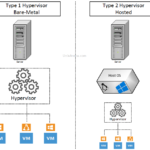
Virtualization helps to decouple the Operating systems and applications from the hardware layer. Virtualization is the process of creating a virtual or software-based representation like a virtual server, application, network, storage resources. Hypervisor is one of the most popular virtualizations technology for servers and operating systems. This enables the IT organization to run more than […]
RVTools 3.11.9 – Simple VMware vSphere Reporting Tool

RVTools is one of the promising reporting tools for VMware vSphere since 2008. It’s a windows based tool which requires .NET 4.6.1 framework to pull the virtual environments information using VI SDK. It supports all the version of the vSphere environment. It can directly connect with vCenter or ESXi (If standalone) to get all the […]
VMware vSphere – How to identify Distributed Switch ID / Portgroupkey ?
VMware vSphere Distributed Switch (VDS) provides a centralized interface to manage the virtual machine’s network for the entire datacenter. Unlike vSphere Standard Switch (VSS), Distributed Switch (VDS) shows the network as an aggregated resource. In VMware vSphere 6.7, VMware vCenter Server instance can support up to 128 VDS and each VDS can manage up to […]